A HUD that fits you.
Move, scale, group and lock your overlays. Keep FPS, coordinates, armor, keystrokes and more exactly where they belong.
MINECRAFT JAVA. YOUR WAY.
Your HUD. Your crosshair. Your whole setup.
A Minecraft client made for the way you play.
Latest stable releaseWindows x64Free download

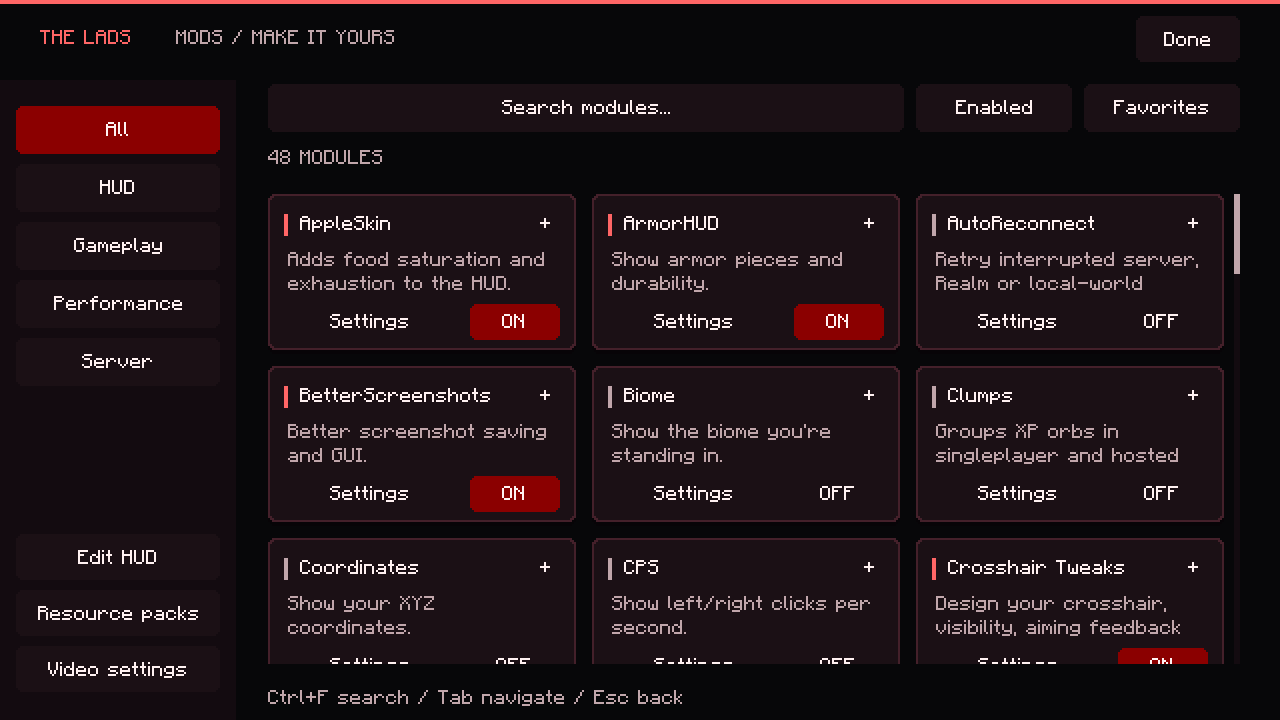
Captured in the client. Built around you.
YOUR SETUP STARTS HERE
Put the information you need where you want it. Fine-tune the details, then get back to playing.
Move, scale, group and lock your overlays. Keep FPS, coordinates, armor, keystrokes and more exactly where they belong.
Design your crosshair, toggle sprint, zoom in and keep an eye on durability. Open your controls with Right Shift.
Adjust world render scale and background frame rates, alongside established performance engines like Sodium and Lithium.
TAKE A LOOK AROUND
THE FEATURE LINEUP
Browse the Lads toolkit and its integrated mods. Availability and implementation vary by Minecraft version.
Move, scale, group and lock overlays, with snapping and previews.
Show your frame rate with configurable refresh and smoothing.
XYZ coordinates, per-axis colors and horizontal or vertical layouts.
Display your current biome by name or ID.
Keep connection latency on screen, with optional color cues.
See equipped armor and its durability.
Track Java memory usage as values or a percentage.
Cardinal directions, degrees or both.
Horizontal travel speed in blocks per second or km/h.
In-world day count and time, with 12-hour formatting.
Health, absorption, food level and saturation indicators.
Experience level and progress toward your next level.
WASD, mouse buttons, spacebar and left/right clicks per second.
Active effects and remaining duration.
See the resource packs currently in use.
Resize, reposition and restyle the sidebar.
Adjust player-list layout and show numerical ping.
Reposition individual vanilla HUD elements.
Display your character and equipment on screen.
Crosshair shapes, a drawing editor, colors, dimensions and aiming indicators.
Hold a key to narrow your field of view.
Toggle movement states without holding their keys.
Adjust brightness for dark environments.
Animated hotbar selection transitions.
Food-value tooltips and saturation, exhaustion and regeneration overlays.
Item durability as numbers, bars or condition text, with color and item filters.
Item identifiers, food values and component details.
Contents previews, inventory badges and world icons from available or previously observed item data.
Animated artwork and sound for kills confirmed by server statistics.
Classic-style camera tilt when taking damage.
Adjust camera motion while jumping and falling.
Control nametag visibility and backgrounds within vanilla visibility rules.
Customize the title screen and the size of its branding.
Hide visual signing indicators while retaining message signatures and reporting data.
Disable narration and its shortcut behavior.
An integrated screenshot gallery, viewer and editor.
Scale world rendering while keeping the HUD and menus at native resolution.
Background, idle and battery profiles with frame-rate, sound and graphics controls.
Adjust render distance for already-loaded block entities.
Group XP orbs in singleplayer and hosted LAN worlds; remote servers control their own XP.
Configure retry delays, conditions and countdowns for interrupted sessions.
Show a warning when incoming server packets stop.
Opt-in rich presence, requiring the project's Discord application configuration.
Upstream rendering performance engine.
Upstream optimizations for game logic, physics and world ticking.
Upstream reductions to block and model memory use.
Upstream optimizations for rendering paths.
Avoid drawing entities hidden behind solid objects.
Upstream lighting-engine optimizations.
Lighting from held luminous items through the bundled upstream engine.
Three-dimensional outer skin layers from the original mod.
Additional third-person player animations.
A customizable debug screen.
Browse and organize in-game statistics.
Browse items, crafting recipes and uses.
Maps, waypoints and world navigation.
Display capes from supported providers; does not grant cape ownership.
Search advancements, track goals and customize toasts.
Browse resources including packs, shaders and worlds.
Fabric mod support and access to upstream mod settings.
Download complete stable packages and restart when Minecraft and sign-in are finished.
Read installed release notes offline or open them from the sidebar.
Choose game profiles, with version-specific client builds and mod manifests.
Download version-specific upstream mods with file-integrity checks.
Grouped navigation, settings, theme accents and the refreshed Play page.
Choose the setup package or a portable Windows x64 download.
No matching features. Try another name or clear your search.
Lads includes its own tools and original third-party mods. Upstream engines keep their own authorship, licenses and settings. This catalog describes the 26.2 toolkit; older versions can use upstream implementations. Exordium is currently unavailable.
READY WHEN YOU ARE
Install once. Future stable launcher updates download and install automatically when your game and sign-in are finished.
Latest stable releaseWindows x64
Release notes & all downloadsThe current stable v1.2.1 Windows x64 package includes Minecraft 26.2 and 1.21.11. Minecraft 26.3 and 1.21.1 are present in development; consult the latest release notes before downloading for a specific version.
Yes. The Lads Client does not include a Minecraft license. You need your own Minecraft: Java Edition account for authenticated online play.
Yes. It follows the latest public stable GitHub release and downloads its Windows installer. The portable button downloads the ZIP from the same release.
Feature availability depends on your Minecraft version and installed mods. XP grouping applies to singleplayer and hosted LAN worlds; remote servers control their own XP. Kill banners require server-reported kill statistics. Discord presence requires project configuration. No FPS improvement is guaranteed.
Live Microsoft sign-in, authenticated multiplayer and every in-game module were not revalidated for v1.2.1. See the release notes for the latest status.